 AutoTest App and Profiles
AutoTest is the most comprehensive NetAlly testing application on CyberScope Air. You can quickly run a variety of test types and save their configurations and network credentials for access whenever you need them. The app is fully customizable with test "Profiles" for
AutoTest establishes the
AutoTest results are automatically uploaded to Link-Live Cloud Service after you claim your CS Air.
AutoTest Topics
This chapter describes AutoTest Profiles, screens, settings, and test results.
See the Overview of how AutoTest works below or skip to one of the following topics:
AutoTest Settings and Profile Groups
Adding and Configuring Profiles
AutoTest Overview
AutoTest consists of three distinct testing levels: Test Targets, Profiles, and Profile Groups. You can create as many Profile Groups, Profiles, and Test Targets as you need.
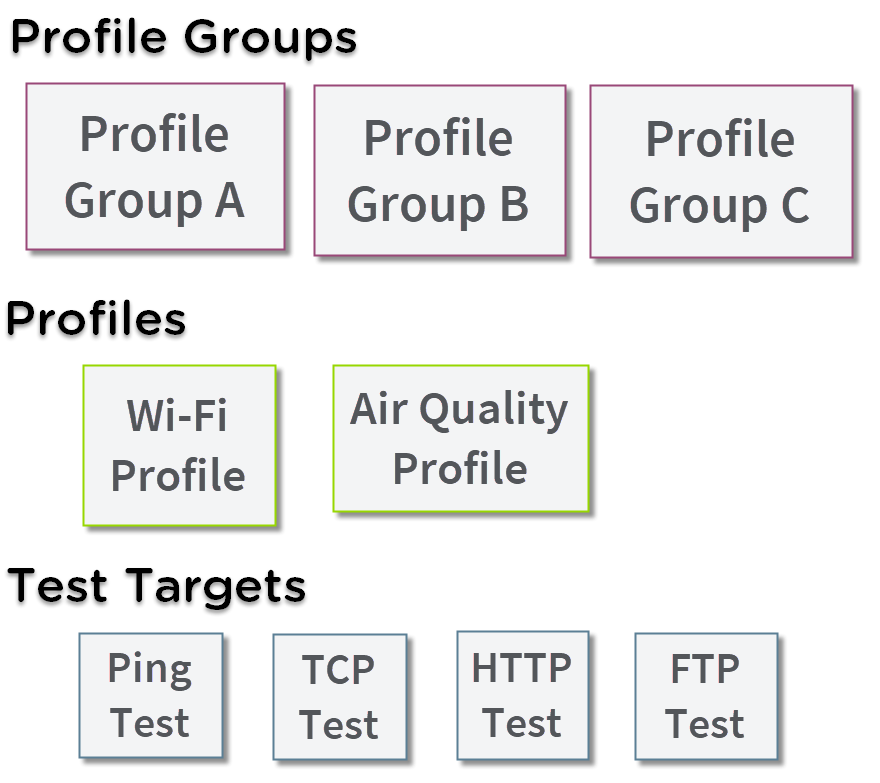
At the bottom level is a set of individual Test Targets that connect to network services, such as a web app or FTP site. A Test Target defines parameters including type, target URL/IP address, port number, and Pass/Fail thresholds. More complex tests, like HTTP, allow further Pass/Fail criteria, such as strings that must or must not be contained in the HTTP body.
A Test Target can be added to and used in any number of Profiles.
A Profile contains a series of individual network tests.
A Profile can be added to and used in any number of Profile Groups.
A Profile Group is a custom-named collection of Profiles. Profile Groups are designed to allow further automation for testing multiple networks or network elements with a single tap of the START button.
A Test Target can be in any number of Profiles, and a Profile can be in any number of Profile Groups.
For example, you can:
-
Test multiple Wi-Fi SSIDs from a single location.
-
Test Wi-Fi access from a conference room.