Your cable passed. Your network still doesn’t work.
A green “PASS” on a certification report means one thing: the copper in the wall meets a standard. It does not mean the port delivers a link, an IP address, or a single usable packet. Certification answers “was the cabling installed correctly?” Validation answers “does the network actually work?” Most teams buy one tester and assume it answers both. It doesn’t, and the gap between the two is where many Monday-morning help desk tickets come from.
Think of a restaurant. The health inspector’s grade in the window says the kitchen is clean, the walk-in holds temperature, and everything is up to code. It says nothing about the food. A Michelin inspector does the opposite: sits down, eats the meal, and judges what actually lands on the plate. Certification is the A in the window. Validation is the star. Plenty of restaurants have the A and serve a terrible dinner, and nobody books a table for the inspection grade.
This overview cuts through the jargon: what each kind of testing proves, what it misses, and which tool belongs in your bag.
Key takeaways
- Certification proves the cable was installed to standard, which is what warranties require. It doesn’t tell you whether the network works.
- Validation proves the link actually works, at the necessary speed.
- On a new build, you’ll usually need both. After that, a validation tester covers the daily work: validating changes and troubleshooting problems.
What is cable certification?
Certification is a compliance check on the physical installation, mostly performed by cabling contractors who installed it. A certification tester measures the cable against industry standards like TIA-568 and ISO/IEC 11801 and produces a pass/fail report. That report goes to the customer, the general contractor, the cable manufacturer backing the warranty, and in some countries to an auditor.
- What it checks: wiremap, length, and electrical performance, including crosstalk, plus alien crosstalk where it applies. Cables are graded against the standard for that type of cable (e.g. Cat 6, Cat 6A, and so on). Fiber gets certified too: Tier 1 measures loss and length against the standard, and Tier 2 adds an OTDR trace that shows where along the run the loss happens.
- What it’s for: newly installed cabling, warranty sign-off, and proving the contractor delivered what was specified. Most cabling manufacturers won’t back a system warranty without a certification report for every drop.
- What it costs: Requires a significant time investment and the most expensive instrument class, which often run five figures and requires a unit at each end.
Here’s the limit that matters. Certification tests the cable by itself, with a tester plugged into each end and nothing else attached: no switch, no network, no traffic. It can tell you a Cat 6A cable is good for 10G. It can’t tell you whether 10G will actually show up. A cable can certify perfectly and still sit behind a misconfigured switch port, a wrong VLAN, a dead DHCP scope, or a PoE budget that’s already spent. The report says the copper is good. It says nothing about the network itself.
That’s the health grade: a spotless kitchen, and no promise about dinner.
What is validation?
Link validation proves the link does its job: plugged into the live network, running at the speed it should, with everything a device needs to get online. A validation tester checks the whole connection, from the jack through the switch and out onto the network, and gives a pass/fail on the key network infrastructure along the way.
When a link fails, the same tester switches from validating to troubleshooting, and tells you what’s wrong and where.
- What it checks: the whole live connection, from the jack through the switch to the services behind it. What it’s for: moves, adds, and changes; verifying a drop before a user plugs in; confirming a cable will carry specific speeds like 2.5G, 5G, or 10G before you commit to it.
- What it costs: minutes per link, on a tool a technician can carry all day.
Validation won’t give you a standards-body certificate. It will tell you whether the port works, which is usually the question someone is asking when they call you.
That’s the Michelin star: it’s earned at the table, not in the kitchen.
Certification vs. validation, side by side
| Certification | Validation | |
| The question | Was the cabling installed to standard? | Does this link work, at speed, on this network? |
| What it proves | The cable meets spec | The link runs at the speed you paid for and gets devices online |
| Sends traffic | No | Yes, at the live-network level |
| Measures delivered link speed | No | Yes |
| Tested on | The cable by itself, with a tester at each end | The live network: The cable and everything past it, including the switch, PoE, and getting online |
| Output | Pass/fail report against a standard | Pass/fail on the live link, plus what’s wrong, and where, if it fails |
| Best moment | New install, warranty sign-off | Moves/adds/changes, outages, “it’s slow” tickets, and sign-off before handoff |
| Fails you when | The problem isn’t in the cable | You need a standards certificate for the customer |
| Who runs it | Typically cabling contractors and installers | Field techs, integrators, network engineers, and managed services providers |
Do you need both?
On a new build, usually yes, but at different times and by different people. The cabling contractor certifies once, at handoff. The IT team or integrator validates when the network goes live, and devices get plugged in.
After that, the daily work is validating moves, adds, and changes and troubleshooting “it’s slow” tickets. A validation tester handles both. Nobody recertifies a cable to fix a help desk call. Recertification is mostly for when cable is replaced or a warranty claim needs evidence.
Neither one replaces the other. Certification protects you against bad cabling. Validation protects you against everything else.
Validate before you upgrade
Validation isn’t only for checking what already works. It also tells you whether your network can handle what you’re about to add. Find a weak link before you buy, and it’s a line item in the project budget. Find it after, and it’s an unplanned purchase: new switches or cabling on a rush order, a second trip to install them, and new access points running below spec, or sitting in boxes, until the fix is in.
Take a Wi-Fi 7 rollout. Many Wi-Fi 7 access points need 802.3bt PoE and a multi-gig uplink to run at full performance. On older 802.3at power, they drop into a reduced-power mode with fewer antennas in use on each radio, and some models also slow their uplink. On a 1G switch port, the port itself becomes the bottleneck. And if the uplink from that switch to the rest of the network can’t keep up with the combined traffic at busy times, everyone connected through that switch slows down.
Validating before you buy answers four questions while any problems are still cheap to fix:
- Can the cable carry the speed? Send real traffic from one end of the cable to the other, and count what doesn’t make it through.
- Can the port deliver the power? Load-test PoE at the switch port to confirm it can supply the power the access point needs, not just what the switch advertises.
- Is the port set up right? Check which speeds the port supports, which VLANs it carries, whether DHCP answers, and whether it can reach the controller or cloud service that will manage the access points.
- Can the backhaul keep up? Measure throughput, loss, latency, and jitter across the uplinks between switches at full speed.
The result is a plan instead of a surprise: you know which cable runs need replacing, which switch ports can’t supply enough power, and which uplinks need upgrading before the first access point arrives. Which tester you need depends on the speeds involved.
Which network tester do you need?
| Tester | Best for |
| LinkRunner AT 1500 | Copper networks up to 1G. AutoTest, Cable Test, and PoE testing. |
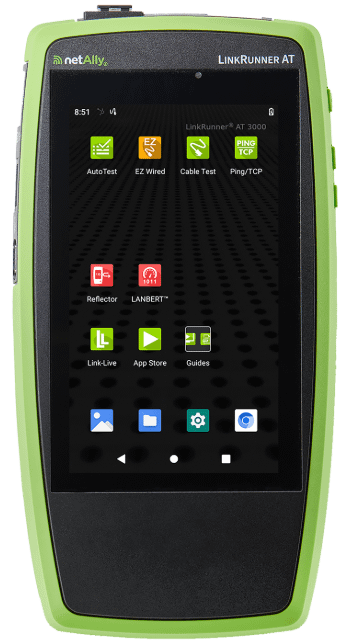
| LinkRunner AT 3000 | Copper and fiber networks up to 1G. Everything in the 1500, plus Ping/TCP, LANBERT, and Reflector Mode. With AllyCare Pro: Discovery, Path Analysis, and Ally Intelligence. |
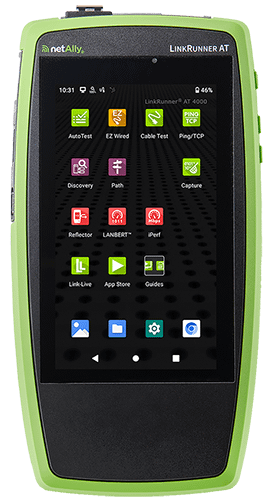
| LinkRunner AT 4000 | Copper and fiber networks up to 1G, with advanced features. Everything in the 3000, plus Packet Capture, iPerf, Periodic AutoTest, and HTTP/FTP response-time testing. With AllyCare Pro: Discovery, Path Analysis, Nmap, and Ally Intelligence. |
| LinkRunner 10G | Multi-gig copper and fiber networks: 2.5G, 5G, and 10G. Line-rate performance testing, LANBERT, Capture, iPerf, Discovery, and Periodic AutoTest. With AllyCare Pro: Path Analysis, Nmap, and Ally Intelligence. |
| LinkRunner 100G | Fiber links from 25G to 100G. AutoTest, Ping/TCP, line-rate performance testing, Discovery, and Periodic AutoTest. With AllyCare Pro: QSFP Insights, FEC threshold settings and grading, Path Analysis, Nmap, and Ally Intelligence. |
On every model, AllyCare Pro also adds Link-Live cloud remote control, software updates, repairs and replacement, and priority support.
Why NetAlly instead of Fluke Networks or TREND Networks?
On a spec sheet, many network testers from different brands look alike. The difference is focus. Fluke Networks and TREND Networks both lead with cable testing. NetAlly doesn’t make certifiers. Our lineage goes back to the industry’s first handheld network analyzer in 1993.
Every NetAlly tool is built for what happens after the cable passes: whether every user and device, from laptops to cameras and access points, can get on the network, run at full speed, and reach what it needs. That’s true across copper, fiber, and Wi-Fi, from 1G to 100G. That focus shows up in five ways:
- Troubleshooting depth: LinkRunner tests whether an application actually answers on its port, even where ping is blocked, and breaks a slow DHCP request down step by step to show where it’s stuck. Path analysis* traces every switch and router between the tester and a failing address, with interface statistics at each hop.
- Ease of use: Ally Intelligence* turns test results into step-by-step guided workflows on supported testers. It distills decades of real-world network engineering knowledge into plain-language instructions anyone on your team can act on. Junior technicians can do more, and senior engineers can fix problems faster.
- Hardware range: One lineup from 1G copper to 100G fiber. LinkRunner 10G sends real traffic at full 10G and counts every frame that doesn’t make it. LinkRunner 100G is the first 100G tester built for enterprise IT, and it validates the optic and grades forward error correction*, so a degrading fiber shows up while the link light is still green.
- Beyond the wire: AirCheck G3 and EtherScope nXG run Wi-Fi site surveys with heatmaps, covering 2.4, 5, and 6 GHz, plus automatic pass/fail analysis and noise, SNR, and interference heatmaps*.
- One collaboration platform: Every NetAlly tool uploads to Link-Live, so wired and Wi-Fi results from across your team land in one place. Link-Live also builds full topology maps*, and a senior engineer can take control of a tester in the field from anywhere*.
*Requires an AllyCare Pro subscription.
The bottom line
Certification is the health inspection grade: the kitchen is clean and up to code. Validation is the Michelin star: someone ate the meal, and it delivered. A “PASS” in the window doesn’t excuse a bad meal. Your users never see the kitchen; they only taste what comes out of it.
If your job ends at the installer’s handoff, certify. If your job starts when someone says “the network is slow,” validate. For most network teams, that second job is the one that shows up every day.
Only NetAlly has purpose-built handhelds for wired and wireless networks that can find the problem — across every layer — in a single Tap. Learn more about NetAlly.