It is a classic scenario: you need to connect four new rack servers, but your Top-of-Rack switch is at capacity and the budget is tight. For most, that is a crisis. For a network engineer, it is just another Tuesday.
But if you are planning a 100G upgrade or already running 100GbE, you likely have more capacity than you realize. Thanks to breakout configurations, that single 100G port isn’t just one pipe – it is four 25G Ethernet lanes in a single package.
In this guide, we are going to cut through the dry specs and explain exactly how MPO breakout works, why it is the standard for high-density data centers, and how to configure a 4x25G setup without the usual headaches.
The “Why”: Solving the Density Dilemma
Let’s look at the scenario. You are dealing with the 100G Ethernet standard (specifically IEEE 802.3 specifications). You need to connect multiple servers, but burning a dedicated 100G port for a single connection is a waste of resources.
This is where the MPO (Multi-fiber Push On) connector proves its worth. Unlike the standard duplex LC connectors (two fibers: one send, one receive), MPO connectors carry multiple fibers in a single housing. This allows you to take one high-speed port and “break it out” into multiple lower-speed connections. It is about efficiency, not just raw speed.
How It Works: The 4-Lane Highway
Think of a standard 10G link as a single-lane road. Now, look at 100G. The IEEE 802.3 specifications define 100G not as one giant lane, but as 4 lanes.
This architecture is a familiar one; we saw it with 40G Ethernet (which was four lanes of 10G). But with the 100G upgrade, those lanes are faster. Because the standard is built this way, we can physically separate these lanes.
Instead of bonding them together to get 100Gbps to one device, we split them up to serve four different devices.
- 1x 100G Port becomes 4x25G Ports.
This gives you flexibility, easier maintenance, and drastically increases your port density without the need for a new chassis.
The Gear: What You Actually Need
Building this 4x25G setup requires specific physical components. It is not just a software setting.
Here is the typical recipe for a breakout configuration:
- The Switch: Must support breakout mode (always check your HCL).
- The Host Module: A QSFP28 optical module (like a 100GBASE-SR4). This goes into your switch.
- The Cable: An MPO breakout cable (MPO12 to 4x Duplex LC) OR a fiber cassette.
- The Client Modules: Four SFP28 optical modules (e.g., 25GBASE-SR) for your servers.
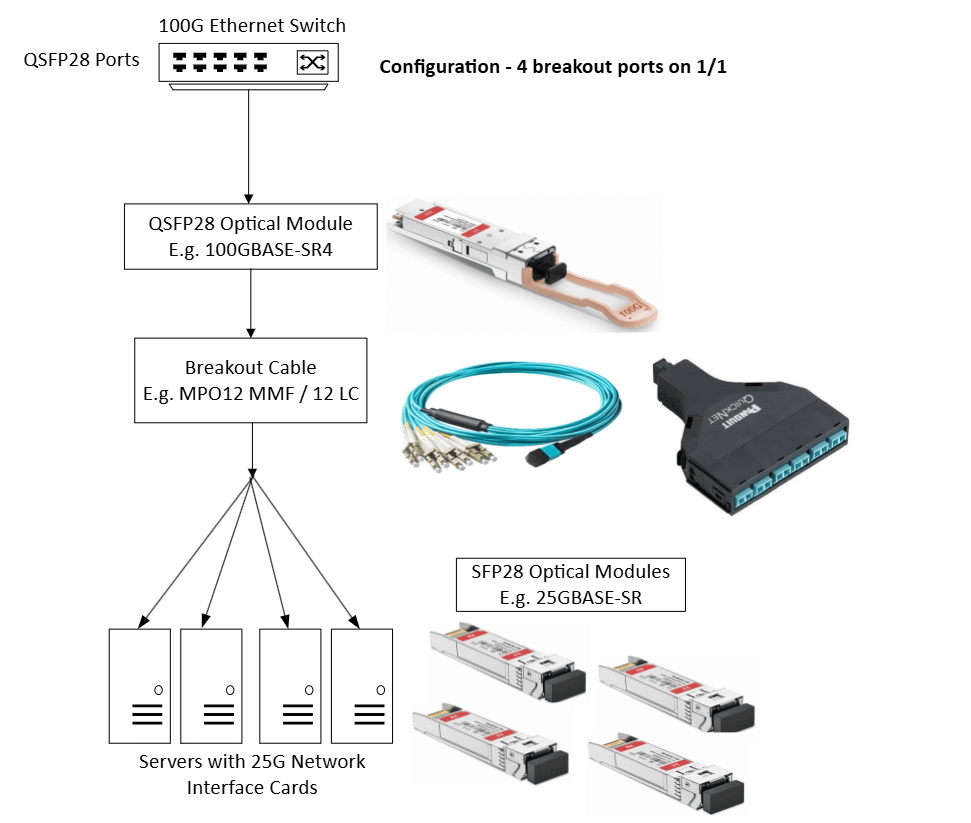
Figure 1: MPO Breakout Example – Turning one port into four.
Pro Tip:
Don’t ignore fiber cassettes. While breakout cables are common, a fiber cassette provides high-density connectivity and cleaner cable management. It allows for rapid deployment and seamless upgrades from 10G (LC) to 40G/100G (MPO) without replacing your backbone cabling.
Configuration: Telling the Switch What to Do
Plugging it in is the easy part. The real work is convincing your switch that port 1 isn’t port 1 anymore.
You need to enter the switch operating system and explicitly tell it to split the lanes. Each vendor has their own syntax, but the logic is the same. You are taking a QSFP28 port and mapping it to four logical interfaces.
For example, on a Cisco Nexus 9300, the command looks something like this: interface breakout module 1 port 1 map 25g-4x
Once executed, that single 100G interface is replaced by four 25G interfaces.
The Physical Layer: MPO Cables & Polarity
Now for the part where things often go wrong: the cabling.
The MPO breakout cable is the physical bridge. On one end, you have the MPO12 connector (plugging into your 100G optic). On the other end, you have a “fan-out” of four duplex LC connectors.
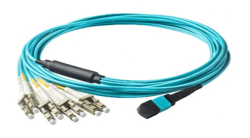
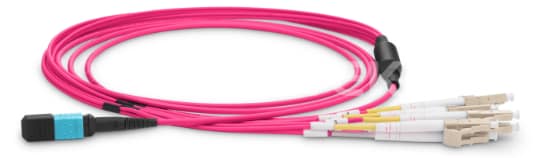
Figure 2 & 3: Multi-mode (top) and Single Mode (bottom) breakout cables. Note the MPO connector on one side and the LC fan-out on the other.
Choosing Your Fiber
- Multi-mode Fiber (MMF): Usually OM3 or OM4. Great for short reaches (up to 100m). This is your standard rack-to-rack cabling.
- Single-mode Fiber (SMF): Needed if your servers are more than 100m away.
The Details: Fiber Mapping and Polarity
Here is where it gets technical. An MPO12 connector has 12 fibers. But 100GbE SR4 only uses 8 of them.
- Fibers 1-4: Transmit (Tx)
- Fibers 9-12: Receive (Rx)
- Fibers 5-8: Unused
The industry standard for this is called Method B (Key up to Key up). It flips the positions so that Transmit on one end matches Receive on the other.
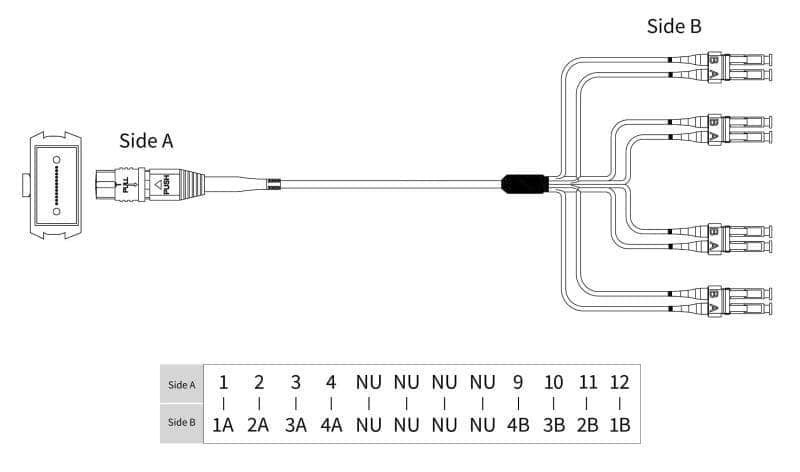
Figure 4: Mapping MPO12 to 4 LC connectors.
The Mapping Breakdown:
- Fiber 1 & 12: Pair 1 (Duplex LC 1)
- Fiber 2 & 11: Pair 2 (Duplex LC 2)
- Fiber 3 & 10: Pair 3 (Duplex LC 3)
- Fiber 4 & 9: Pair 4 (Duplex LC 4)
Pro Tip:
When ordering, double-check your polish types. Mixing APC (Angled Physical Contact) and UPC (Ultra Physical Contact) is a guaranteed way to ruin your signal.
Conclusion
100G Ethernet is a capable technology. By using breakout configurations, you can adapt your high-speed core to support 10G, 25G, or 50G devices efficiently. Whether you are dealing with PAM4 signaling in newer standards or standard NRZ in 100GBASE-SR4, the concept remains the same: do more with less.
The MPO connector might look like a single link, but underneath, it is a multi-lane highway waiting to be utilized. By understanding the physics and the configuration, you can maximize your current infrastructure and delay that expensive chassis upgrade just a little bit longer.
FAQ
What cable type is needed for 100G? It depends on the distance. For runs under 100m, Multi-mode fiber (MMF) with OM3 or OM4 is standard. For anything longer than 100m, you will need Single-mode fiber (SMF). Always match your optical module to the fiber type.
How far does 100G reach over fiber? It varies by standard. 100GBASE-SR4 (Multi-mode) reaches about 100m. However, Single-mode fiber paired with the appropriate optics can reach up to 40km or even 80km without amplification.
What is the difference between MPO and MTP? MPO (Multi-fiber Push On) is the generic interface standard. MTP (Multi-fiber Termination Push-on) is a specific brand of high-performance MPO connector manufactured by US Conec. In the field, the terms are generally used interchangeably.