You have just racked your new switches, run the fiber, and plugged in the transceivers. The link lights should be blinking, but instead, you are staring at dead air. You swap the cable ends, and suddenly, the link comes up. What just happened?
If you are used to copper networks, you probably rely on Auto-MDI-X to magically sort out your transmit and receive pairs. But in the world of fiber optics, especially when dealing with a 100G upgrade, that magic does not exist. Fiber connections depend on manually ensuring the proper alignment of the transmit (Tx) and receive (Rx) sides.
In optical links, this orientation is called Polarity. In this guide, we will explain why Auto-MDI-X is missing from fiber ports and how to navigate the complexities of fiber polarity without losing your mind.
Fiber Polarity Explained: No Auto-MDI-X on Fiber Ports
Fiber optic communication relies on two-way transmission using a pair of fiber strands. You have a transmitter on one side connecting to a receiver on the other end. The TIA standard TIA-568.3-E defines optical cable polarity for both duplex and multi-fiber cables.
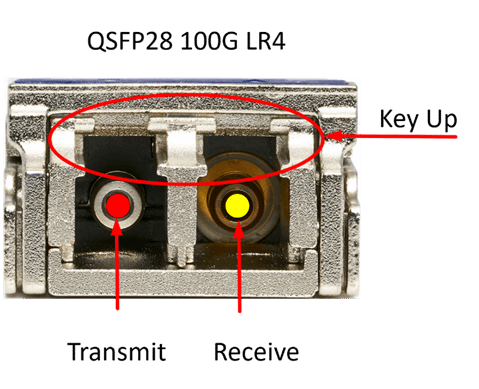
Unlike copper, there is no negotiation or automatic configuration in the transceiver to adapt to a strand that is receiving light and convert it to a receiver. The two ends terminate in either a transmitter or a receiver. If you look into a QSFP28 module, the transmitter is on the left, and the receiver is on the right.
Why Auto-MDI-X Doesn’t Exist on Optical Links
Fiber optic standards and the physical hardware simply do not support the electronic switching required to reconfigure optical paths. The electronics of Ethernet over copper can reverse the transmit and receive functions of the wire pairs. Optical fiber, however, requires a fixed physical orientation: one strand transmits light, and the other receives it.
- Physical Hardware: Fiber transceivers use a laser for transmission and a photodiode for receiving. These optical elements cannot switch roles. A laser cannot suddenly decide to become a photodiode.
- Layer 1: Fiber optic systems designed for high-speed links (like the 100G Ethernet standard) lack the physical level pulse used in copper systems to detect and negotiate MDI-X settings prior to establishing a link.
Pro Tip:
Laser Safety is not a suggestion. Working with fiber optics and lasers requires strict adherence to safety regulations. Never look directly into the end of a fiber transceiver or a patch cable. The laser may be active but invisible to the naked eye, and serious, permanent eye damage can result.
Understanding Fiber Polarity: The Missing Auto-MDI-X
The single-pair duplex case is the foundation for understanding polarity.
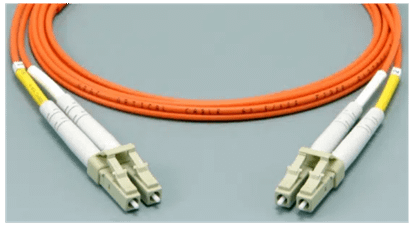
At the end of a duplex transceiver, there are two fibers. One fiber has a laser transmitting light, while the other has a receiver detecting light. Note the orientation of the connector with the key facing up. The LC fiber patch cord is keyed with a clip that orients the cable correctly in the transceiver.
Establishing a link requires that the fiber patch cord connects the Transmit (B) side of one transceiver to the Receive (A) side of the other.
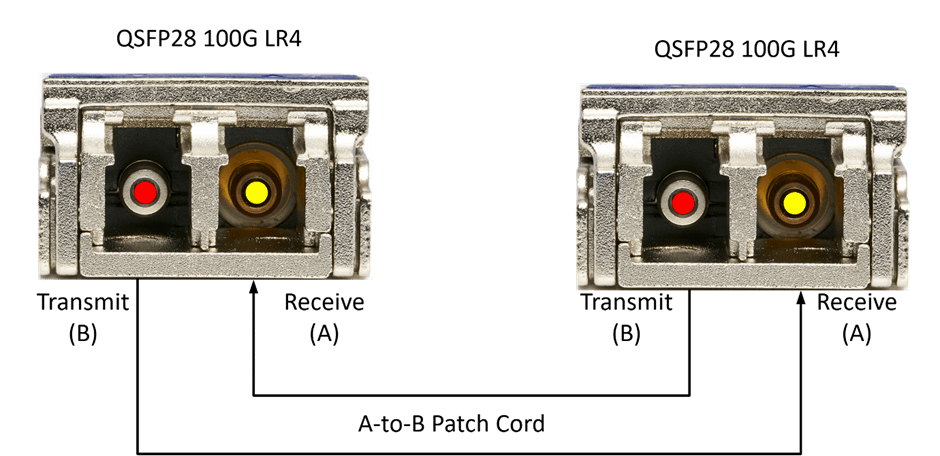
There are two main types of duplex patch cords: the A-to-A and the A-to-B. The A-to-B is the most common.
In an A-to-B patch cable, the receivers (A) are connected to the transmitters (B).

A straight-through A-to-A patch cable connects without crossing the pairs.

The A-to-A patch cord plays a role when connections are made in structured cabling systems where an A-to-B crossover has already occurred in the cabling link at one end. Only one crossover is needed for the entire link.
Multi-Fiber Polarity
The MTP/MPO multi-fiber cables build on this concept, managing polarity for each of the 4 pairs. The MPO12 connector has a single row of 12 fibers and is keyed to ensure correct insertion into the transceiver.
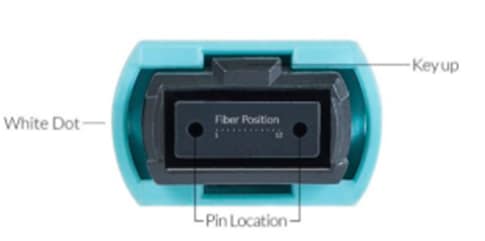
A standard MPO12 breakout cable illustrates the arrangement of each fiber. In a typical 100GbE scenario using IEEE 802.3 standards, the 4 middle fibers are often unused.
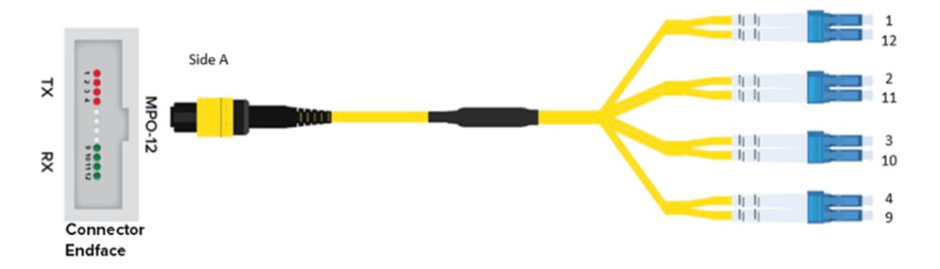
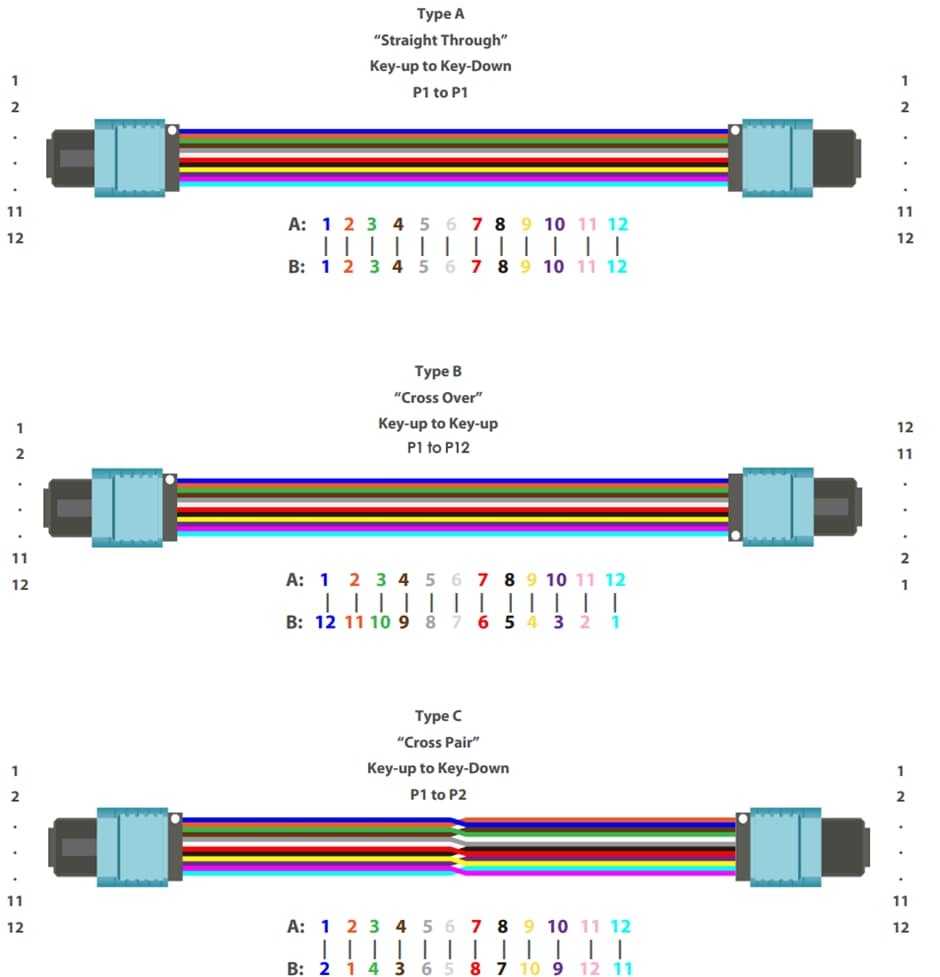
There are three different 12-fiber MTP/MPO cables defined in the TIA-568.3-E standard:
- Method A (Type A cables): Straight-through cables.
- Deployed in structured cabling systems between cassettes of fiber patch panels.
- Key Up to Key Down orientation.
- Method B (Type B cables): Reverse sequence cables.
- Deployed in transceiver-to-transceiver connections.
- Key Up to Key Up orientation.
- Method C (Type C cables): Pair-wise reversed cables.
- Deployed with Type A cassettes and A-to-B patch cables on both ends for equipment connections.
- Not recommended due to added complexity.
Conclusion
Whether you are dealing with standard NRZ or advanced PAM4 signaling, understanding fiber polarity is non-negotiable for a successful deployment. Without Auto-MDI-X to save the day, network engineers must rely on proper planning, the right cables, and a solid grasp of Methods A, B, and C to keep the data flowing.
FAQ
How can I tell what type of cables I have?
Patch cables commonly have an indication of which cable is A and which is B. This might be a small ring clipped onto the cable end or heat-shrink color coding. For example, color coding might indicate an A-to-B patch cable where the yellow-marked fiber is on the left (transmit) side on one connector and on the right (receive) side on the other.
Are there adaptors that change the polarity of fiber optic cables?
Yes, there is a wide variety of adaptors available for polarity changes. These are specific to the fiber type (MMF or SMF), end-face polish (APC and UPC), and connector types (LC, MPO, etc.).