Network bandwidth demands are quickly outgrowing 10G and 40G network designs. As organizations adopt AI workloads, real-time applications, and cloud-first architectures, legacy backbones simply cannot keep up. To support this growth, data centers and large enterprises are standardizing on 100 Gigabit Ethernet (100GbE) as the new baseline for high-performance connectivity.
At the heart of these deployments is the QSFP28, a compact, high-density transceiver. It is the essential component that enables flexible, scalable connectivity across switches, routers, and servers. More importantly, it provides the bridge for the 100G upgrade path, allowing interoperability with existing 25G and 50G infrastructure.
This guide explains what QSFP28 is, how it works within the 100G Ethernet standard, and what network engineers should consider when planning upgrades, validating links, or troubleshooting interoperability issues.
Table of Contents
QSFP28 Definition
The QSFP28 transceiver (Quad Small Form-factor Pluggable 28) is the industry standard module for 100GbE. It is a hot-pluggable module that uses four lanes of 25G electrical signals to deliver a total data rate of up to 100 Gbps.
The “28” in the name refers to the maximum speed of each lane (up to 28 Gbps), though in 100G Ethernet applications, they typically operate at 25 Gbps. This “Quad” architecture allows for high efficiency compared to older, bulkier form factors.
The Evolution of Speed
The form factor has evolved significantly to meet the need for higher density and speed. We have moved from the single-lane SFP (1G) and SFP+ (10G) to the high-density QSFP28.
By increasing per-lane speed rather than physical size, QSFP28 enables higher port density and lower power consumption per gigabit. This is a critical advantage in modern data centers where rack space and power budgets are often constrained.
Key QSFP28 Specifications & Capabilities for 100G Ethernet
A QSFP28-based link is a layered system of interacting components. While modules may look identical externally, their internal capabilities vary based on the IEEE 802.3 standards and MSA SFF-8665 specifications they adhere to.
This ecosystem supports a wide range of use cases, from short-reach switch interconnects to long-distance campus links. It also introduces flexibility in signaling: link speeds of 25G, 40G, and 50G are all possible in addition to 100G, depending on the configuration.
Pro Tip:
Pay close attention to the detailed specifications of the QSFP28 modules you are considering. Subtle details – such as the difference between electrical and optical Forward Error Correction (FEC) – can profoundly affect switch port configurations. Mismatched FEC settings are a common cause of link failures.
QSFP28 Use Cases in 100G Ethernet Deployments
The variety of QSFP28 options exists because 100G Ethernet serves many different applications, each with specific requirements for distance, fiber type, and cost.
- Short-Range Data Center Links – For connections inside the rack or between neighboring racks (typically under 100 meters), 100GBASE-SR4 is the standard. These modules use multimode fiber and parallel optics to prioritize density and cost-efficiency.
- Long-Range Campus Interconnects – For distances measured in kilometers, single-mode optics such as 100GBASE-LR4 are required. These links are more sensitive to fiber quality, attenuation, and proper validation than their short-range counterparts.
- 100G to 25G and 50G Breakout Architectures – In Top-of-Rack (ToR) designs, a single QSFP28 port can be “broken out” into four separate 25G lanes. This allows a 100G switch port to connect directly to four servers with 25G NICs. Similarly, the 100G switch port can also break out to 2 50G links for the cases where servers have 50G NICs. This approach maximizes port utilization and simplifies cabling infrastructure.
Real-World Constraints
Deployments often face constraints that influence QSFP28 selection:
- Fiber Availability: Do you have enough strands for parallel optics, or must you use multiplexing (WDM) over a single pair?
- Existing Infrastructure: How do you integrate with legacy 10G transceivers or 40G equipment remaining in service?
- Power and Cooling: Switches operating multiple 100G ports draw significantly more power. Ensure the electrical service in the racks can power the new high-density switches.
100G Ethernet – Narrowing the choices
Selecting the right module depends heavily on your specific application parameters. The following table provides guidance for selecting QSFP28 optical modules based on distance and media.
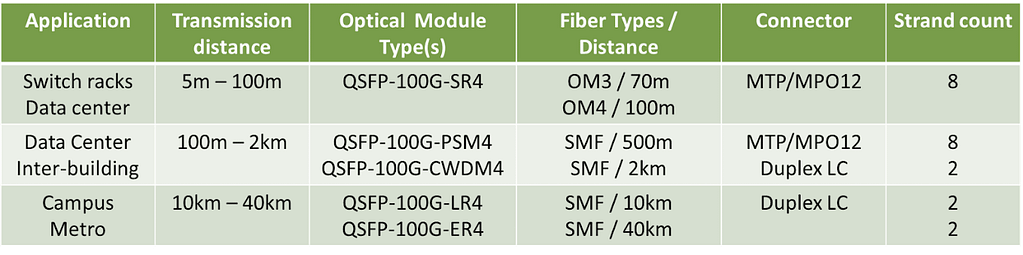
As you explore 100G Ethernet further, several technical factors become critical for network architecture:
- PAM4 (Pulse Amplitude Modulation 4): An advanced modulation technique that encodes two bits per symbol, doubling the data rate compared to traditional NRZ. This is essential for next-generation speeds.
- BiDi (Bi-directional): Technology that allows transmission in both directions on a single fiber strand using different wavelengths. Bi-directional is a key technology when the number of fibers is limited. Bi-directional transceivers are often vendor-specific and not always standardized.
- FEC (Forward Error Correction): This technology adds redundant bits to the data stream, allowing the receiver to correct errors without re-transmission. FEC increases the reliability of the optical link, enabling greater distances. In addition, by reducing the instances of re-transmission, the network achieves higher application throughput.
QSFP28 for 100G Ethernet: Compatibility & Upgrade Paths
Even when modules comply with IEEE and MSA SFF-8665 specifications, interoperability is not guaranteed.
Vendor Consistency
Switch vendors often design their equipment to work best with their own branded modules. While it is possible to use third-party optics, mixing vendors can complicate troubleshooting.
- Best Practice: Minimizing the mixing of vendors is recommended for ease of interoperability.
- Management: Single-vendor environments generally offer more consistent documentation and configuration commands.
Upgrade Paths: From 40G to 100G – and Beyond
A primary concern for network engineers is the migration path. How do you move from current speeds to 100G without replacing every piece of hardware simultaneously?
- Upgrading from 40G Ethernet – The 40G Ethernet infrastructure is built on the QSFP+ transceiver. Fortunately, the QSFP28 port is generally backward compatible with QSFP+. This means you can often use existing 40G transceivers in new QSFP28 ports during a transition phase until the full link is upgraded to 100G.
- The 25G Transition – For many enterprises, the jump is from 10G to 25G at the server level. Since 100G is effectively 4x25G, QSFP28 is the natural aggregation point. This allows for a gradual upgrade where the core moves to 100G while the edge moves to 25G.
- Planning for 400G Ethernet – The industry is already moving toward 400G Ethernet. Modern 400G transceivers (like QSFP-DD) commonly support breakouts to 4x100G links. Standardizing on QSFP28 now creates a logical steppingstone toward these higher-speed architectures.
Summary
100G Ethernet and QSFP28 are the standard for high-performance networks. They offer the speed you need and a logical upgrade path from 10G or 40G. But as we’ve seen, this flexibility comes with technical hurdles – like matching FEC settings or dealing with vendor compatibility.
Planning is half the battle. The other half is verification. Don’t just rely on vendor promises or hope for the best. Using independent test tools gives you the facts you need to validate links and solve interoperability issues quickly, without the guesswork.
FAQ
How do I know if an optical module is going to interoperate with other modules?
For 100G Ethernet, transceivers must be compliant with the QSFP28 Multi-Source Agreements (MSA):
- SFF-8665: QSFP28 100G Electrical Interface
- SFF-8679: QSFP28 100G Electrical Connector
- SFF-8680: QSFP28 Module and Cage
Is it possible to connect a 100G port to a 10G port?
Yes, typically by using a QSA (QSFP to SFP) adapter. This allows a QSFP28 port to accept a 10G SFP+ transceiver. However, the switch port must be explicitly configured to operate at 10G speed.
Can I run 100G Ethernet over Copper cabling?
Yes, using Direct Attach Copper (DAC) cables. This is an integrated assembly of two QSFP28 modules and a copper cable, typically limited to 5 meters. DACs are cost-effective for short distances but are bulky and lack flexibility compared to optical systems.
The QSFP28 interface specifies NRZ encoding, how do I get PAM4?
The standard QSFP28 electrical interface uses NRZ encoding. If a specific application requires PAM4, the conversion happens inside the optical module itself. The switch provides NRZ signals, and the module translates them to PAM4 for optical transmission.