“The network is slow!”
It’s the complaint that sends shivers down every network engineer’s spine. But here’s the thing – when users say “slow”, they’re usually talking about four different problems at once: bandwidth, speed, throughput, and latency. Understanding the difference between these concepts isn’t just technical nitpicking. It’s the key to actually fixing the problem instead of throwing money at bigger pipes that won’t solve anything.
This guide breaks down what network bandwidth really means, how it affects your infrastructure, and, most importantly, how to optimize it so you can stop playing at network firefighter.
Table of Contents
- What is Bandwidth in a Network?
- What is Good Network Bandwidth for Different Activities?
- Network Bandwidth vs Speed vs Throughput vs Latency
- How to Test and Measure Network Bandwidth
- What Uses the Most Bandwidth on Your Network?
- Factors That Affect Network Performance
- How to Increase and Optimize Network Bandwidth
- Network Bandwidth Planning and Monitoring Best Practices
- Why is Higher Bandwidth Better? Understanding the Benefits
- Troubleshooting Common Network Bandwidth Issues
- Conclusion
What is Bandwidth in a Network?
If you’re looking for a clear bandwidth definition, here it is: network bandwidth is the maximum amount of data that can be transmitted over a network connection within a specific time period. When people ask ‘what is bandwidth,’ they’re referring to volume: think of it as the maximum number of cars that can pass through a highway section in a given time, rather than how fast a single car is moving.
Bandwidth is measured in bits per second (bps), though you’ll more commonly see Mbps (megabits per second) or Gbps (gigabits per second) in modern networks. A 1 Gbps connection can theoretically handle up to one billion bits of data per second. But here’s the catch: it’s a theoretical maximum. Your actual performance depends on cable quality, how many users are online, and dozens of other factors.
Think of a 10-lane highway (high bandwidth) versus a 2-lane road. More lanes mean more capacity, but construction or accidents still cause slowdowns regardless of how many lanes you have.
Key aspects of bandwidth
- Maximum capacity, not actual performance
- Time-based measurement (data per second)
- Measured in bps, Mbps, or Gbps
- Directly impacts how many simultaneous operations your network can handle
- Can determine whether applications run smoothly or start lagging
What is Good Network Bandwidth for Different Activities?
So, how much bandwidth do you actually need? The answer depends entirely on what you’re doing with it. Here’s a breakdown of bandwidth requirements for different use cases:
| Basic Internet Use (3-25 Mbps) | Streaming & General Business Use (25-100 Mbps) | Advanced Use (100+ Mbps) |
|---|---|---|
| Email and web browsing | Cloud-based productivity tools | High-density user environments |
| Standard definition video calls | Standard file transfers | Large file transfers and backups |
| Basic cloud application access | Multiple simultaneous users | Data-intensive applications |
| HD video conferencing | ||
| 4K video streaming |
Enterprise Considerations
For organizations, multiply these numbers by your user count, then add 20-30% overhead for peak usage. A company with 100 users running video conferencing, cloud apps, and regular file transfers needs multi-gigabit capacity – not because each individual user needs that much, but because they all hit the network simultaneously.
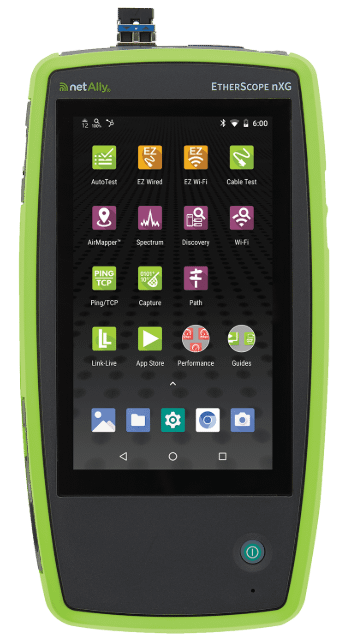
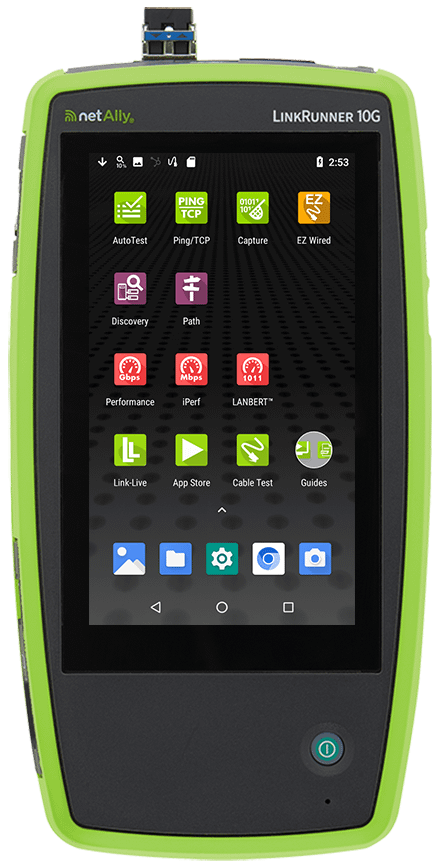
Understanding how much bandwidth your specific environment requires prevents both over-provisioning (wasting money) and under-provisioning (frustrating users). Tools like the EtherScope nXG and LinkRunner 10G help verify you’re actually getting the speeds you’re paying for with performance testing up to 10Gbps.
Pro Tip:
Don’t just calculate average bandwidth needs – monitor your peak usage patterns. I’ve seen networks with plenty of average capacity that crumble during the 9 AM “everyone logs in at once” rush. Understanding your peak demands prevents those morning fire drills.
Network Bandwidth vs Speed vs Throughput vs Latency
When comparing bandwidth vs. speed, throughput, or latency, here’s what you need to know:
Bandwidth is your maximum potential capacity – think of it as the maximum number of cars that could pass through a highway section in a specific timeframe under perfect conditions.
Speed is how fast data moves from point A to point B – like how fast individual cars can drive. In data transmission, signals travel at roughly the speed of light. What changes is how much data you can pack into those signals.
Throughput is the actual amount of data successfully transmitted – how many cars actually reach their destination per hour. It’s always lower than bandwidth due to congestion, packet loss, and protocol overhead.
Latency is the delay before data transfer begins – like sitting at a red light before entering the highway. High latency means long waits before anything happens.
Here’s the complete picture: Imagine a highway designed to handle thousands of cars per minute (high bandwidth) where cars can drive 80 mph (high speed potential). However, you have to sit at a red light for 5 minutes before entering (high latency), and road construction causes only half the possible cars to get through per hour (low throughput). The capacity exists, but delays and congestion kill actual performance.
How to Test and Measure Network Bandwidth
Wondering how to check network bandwidth or how to determine bandwidth on your network? Testing bandwidth properly means going beyond simple speed tests. Here’s how to run a proper bandwidth test:
Types of Bandwidth Tests
Speed tests measure peak data transfer rates at a specific moment. However, they aren’t reliable for Local Area Network (LAN) bandwidth, as results are capped by your ISP subscription rather than showing your network’s full internal capacity.
Capacity tests evaluate the maximum bandwidth your network can consistently handle under various conditions.
Stress tests push your network to its limits to see where it breaks and if your infrastructure can actually deliver what it promises.
Professional Tools for Measuring Network Bandwidth
NetAlly instruments like the EtherScope nXG and LinkRunner 10G feature Performance Test capabilities that go way beyond consumer-grade speed tests. These tools can:
- Stress test critical network links with up to eight simultaneous data streams
- Verify line-rate performance up to 10Gbps
- Measure throughput, packet loss, latency, and jitter
- Test compliance against service level agreements (SLAs)
- Provide upstream and downstream analysis
| Metric | What It Measures | Why It Matters |
|---|---|---|
| Download Speed | Data from server to device | User experience for file transfers and streaming |
| Upload Speed | Data from device to server | Video conferencing |
| Latency | Delay before transfer begins | Real-time application performance |
| Jitter | Variability in packet delivery | VoIP quality |
What Uses the Most Bandwidth on Your Network?
Understanding bandwidth usage and identifying what uses most bandwidth is critical for network management. Let’s talk about bandwidth hogs – the applications and devices that consume excessive capacity.
The Big Offenders:
- 4K/UHD video streaming (25+ Mbps per stream)
- Video conferencing, especially with multiple participants
- Large file downloads and cloud backups
- Software updates pushed to multiple devices simultaneously
The Sneaky Culprits:
- Background cloud sync services
- Security camera feeds
- Smart home devices
- Malware or compromised devices participating in botnets
NetAlly’s EtherScope nXG provides a complete inventory of connected devices via its Discovery app. However, its true power lies in measuring maximum achievable bandwidth. Instead of guessing if your infrastructure can handle the load, you’ll have hard data proving the actual capacity available across your network.
Factors That Affect Network Performance
Even with plenty of bandwidth, network performance can suffer. Understanding what causes low network performance helps you troubleshoot faster.
Physical Infrastructure:
- Transmission medium (fiber vs copper vs wireless)
- Cable quality and electromagnetic interference (EMI) affecting copper – route cables away from power lines if you’re seeing issues
- Distance to servers increasing latency
Network Configuration and Design:
- Router and equipment limitations – monitor CPU and memory usage; if consistently high, upgrade your hardware
- Number of connected devices sharing bandwidth – implement QoS policies to prioritize critical traffic
- Network congestion during peak hours
- Device performance and configuration issues
Environmental Factors:
- Interference from neighbors’ Wi-Fi networks – use AirCheck G3 or EtherScope nXG to analyze channel utilization and switch to less congested channels
- Physical obstacles affecting wireless signals
How to Increase and Optimize Network Bandwidth
Start with bandwidth optimization before upgrading.
Quick Wins:
Quality of Service (QoS) prioritizes critical traffic – give priority to video conferencing and business apps while deprioritizing streaming during business hours.
Traffic shaping and bandwidth limiting prevent applications or users from monopolizing resources.
Schedule bandwidth-intensive tasks like backups and updates during off-peak hours.
Router and Equipment Optimization:
Position routers centrally, switch to less congested Wi-Fi channels, update firmware regularly, and verify your router can handle your internet speeds. Use wired connections for servers, workstations, Wi-Fi access points, and VoIP phones. Manage connected devices by disconnecting unused ones and limiting guest access.
Infrastructure Improvements:
Upgrade outdated equipment if it’s creating bottlenecks. Optimize network topology by reducing unnecessary hops. Use load balancing to distribute traffic across multiple connections.
When to Upgrade vs Optimize:
If you’re consistently hitting 80%+ utilization during business hours after implementing these strategies, upgrade your infrastructure. But if you’re maxing out because of streaming videos during work hours, fix the policy first.
Network Bandwidth Planning and Monitoring Best Practices
Effective bandwidth and network capacity planning prevent problems before they start.
Calculate Bandwidth Requirements
Identify applications your users need, determine each application’s bandwidth requirements, multiply by simultaneous users, then add 20-30% overhead.
Example: 100 users × 2 Mbps (video conferencing) + cloud apps (50 Mbps) + file transfers (100 Mbps) + 30% overhead = ~455 Mbps minimum capacity.
Capacity Planning Methodology
- Assess current usage with bandwidth monitoring tools to establish baselines
- Identify peak periods when your network hits maximum utilization
- Project growth based on planned headcount, new applications, and technology changes
- Plan for redundancy – keep capacity below 80% for performance buffers
Growth Planning
Plan ahead for new office locations, cloud migrations, increased video conferencing, IoT deployments, and remote worker VPN connections. Quarterly network assessments keep your bandwidth planning ahead of business needs.
Why is Higher Bandwidth Better? Understanding the Benefits
Is higher bandwidth better? It depends. Higher bandwidth brings real benefits, but it’s not always the solution.
Benefits of High Bandwidth
More bandwidth means more simultaneous operations without slowdowns. Multiple users can run video conferences, transfer files, and access cloud applications at the same time. Bandwidth benefits include faster file transfers, smoother video conferencing, better cloud app performance, and support for more devices.
Does Higher Bandwidth Mean Faster Internet?
Not exactly. Higher bandwidth increases capacity, but actual speed depends on multiple factors. More lanes help, but high latency or packet loss still slow you down.
When High Bandwidth Won‘t Help
More bandwidth won’t fix high latency, packet loss, poor Wi-Fi coverage, slow servers, or outdated network adapters. Real-time applications like video conferencing need low latency more than high bandwidth. A 100 Mbps connection with 200ms latency performs worse than 50 Mbps with 20ms latency.
When You Actually Need More Bandwidth
Upgrade when you consistently hit 80%+ utilization during business hours, monitoring shows sustained high usage, or planned growth will exceed capacity. Before upgrading, use tools like EtherScope nXG to verify bandwidth is really your bottleneck – often, fixing configuration or Wi-Fi issues solves “slow network” complaints without needing more capacity.
Troubleshooting Common Network Bandwidth Issues
Dealing with low bandwidth or slow network speeds? Here’s how to diagnose and fix bandwidth issues.
Signs of Low Bandwidth
Slow file transfers, buffering video, choppy conferencing, websites taking forever to load, and multiple users experiencing slowdowns simultaneously.
Common Causes
Too many devices consuming bandwidth, background applications, network congestion during peak hours, ISP throttling, outdated equipment, or malware.
Troubleshooting Guide
- Network feels slow despite plenty of bandwidth: Check latency and packet loss first. Use EtherScope nXG‘s Path Analysis to trace where delays occur.
- Performance degrades during specific times: Network congestion. Run tests during peak and off-peak periods, then implement QoS policies or schedule intensive operations for off-hours.
- Specific applications performing poorly: Application-specific issues, not bandwidth. Video conferencing needs low latency – even 2% packet loss ruins calls.
- Wi-Fi slower than wired: Check for interference, channel congestion, or poor signal coverage. Use AirCheck G3 to analyze signal strength, channel utilization, and identify non-wi-fi interference sources.
When to Contact Your ISP vs Optimize Locally
Contact your internet provider (ISP) when speed tests consistently show speeds well below your plan, but local area network services are not impacted. Optimize locally when only certain devices are affected, when speeds slow down accessing local servers, or Wi-Fi performs poorly but wired works fine.
NetAlly’s EtherScope nXG and LinkRunner 10G measure actual throughput and identify whether bandwidth or other factors cause your problems.
Conclusion
Network bandwidth isn’t just about Mbps numbers. It’s about understanding the difference between capacity, speed, throughput, and latency – then using that knowledge to solve actual problems.
Smart network engineers monitor usage patterns, plan for growth, optimize traffic flow, and troubleshoot systematically. They know when to upgrade bandwidth and when to fix configuration issues instead.
With proper planning, monitoring tools, and professional testing equipment like EtherScope nXG and LinkRunner 10G, you’ll spend less time reacting to complaints and more time on strategic improvements.
Need professional-grade tools to test, monitor, and optimize your network bandwidth?
- EtherScope nXG – Complete wired and wireless network analysis with Performance Testing up to 10Gbps
- AirCheck G3 – Wi-Fi specific testing to identify interference, analyze channels, and troubleshoot wireless bandwidth issues
- LinkRunner 10G – Multi-gigabit testing and LANBERT media qualification to verify your wired infrastructure can handle the bandwidth you need
- Link-Live – Cloud platform for collaborating with remote team members